
Recently, I needed to customize the default form of a SharePoint list. The requirement is that the choice values be displayed in the dropdown control with related icons, and some options be disabled for users.
To achieve this, I created an SPFx Form Customizer extension and built the form using Fluent UI React controls, such as Dropdown, Text, and Button. While testing this form customizer extension locally, the following error was displayed in the browser.
Sorry, something went wrong

An unexpected error has occurred.

Technical Details
Troubleshoot issues with Microsoft SharePoint Foundation.
Correlation ID: 9a39dba1-306a-0000-1f0e-3d03870b0871
Date and Time: 11/20/2025 5:20:55 AM
Then copied the debug URL from the browser, and I noticed it was still pointing to the default site and list names. You can also see the url below.
https://szg52.sharepoint.com/sites/SPFXDevelopment/_layouts/15/SPListForm.aspx?debugManifestsFile=https%3A%2F%2Flocalhost%3A4321%2Ftemp%2Fbuild%2Fmanifests.js&loadSPFX=true&componentId=a35bc6fc-8bb7-4317-9031-acfbb19d58cc&PageType=8&RootFolder=%2Fsites%2FmySite%2FLists%2FMyList&properties=%7B%22sampleText%22%3A%22Value%22%7DAfter adding the actual SharePoint site name and list name in the serve.json file, the error got resolved. Let’s see the complete solution in the section below.
Fix: Sorry, something went wrong Error
Open the serve.json file in the config folder of the SPFx form customizer solution, and the code will appear as shown below. The “RootFolder” has the value “/sites/mySite/Lists/MyList” which is causing the issue.
{
  "$schema": "https://developer.microsoft.com/json-schemas/spfx-build/spfx-serve.schema.json",
  "port": 4321,
  "https": true,
  "serveConfigurations": {

    "default": {
      "pageUrl": "https://szg52.sharepoint.com/sites/SPFXDevelopment/_layouts/15/SPListForm.aspx",
      "formCustomizer": {
        "componentId": "a35bc6fc-8bb7-4317-9031-acfbb19d58cc",
        "PageType": 8,
        "RootFolder": "/sites/mySite/Lists/MyList",
        "properties": {
          "sampleText": "Value"
        }
      }
    },
    "frmProjectRequests_NewForm": {
      "pageUrl": "https://szg52.sharepoint.com/sites/SPFXDevelopment/_layouts/15/SPListForm.aspx",
      "formCustomizer": {
        "componentId": "a35bc6fc-8bb7-4317-9031-acfbb19d58cc",
        "PageType": 8,
        "RootFolder": "/sites/mySite/Lists/MyList",
        "properties": {
          "sampleText": "Value"
        }
      }
    },
    "frmProjectRequests_EditForm": {
      "pageUrl": "https://szg52.sharepoint.com/sites/SPFXDevelopment/_layouts/15/SPListForm.aspx",
      "formCustomizer": {
        "componentId": "a35bc6fc-8bb7-4317-9031-acfbb19d58cc",
        "PageType": 6,
        "RootFolder": "/sites/mySite/Lists/MyList",
        "ID": 1,
        "properties": {
          "sampleText": "Value"
        }
      }
    },
    "frmProjectRequests_ViewForm": {
      "pageUrl": "https://szg52.sharepoint.com/sites/SPFXDevelopment/_layouts/15/SPListForm.aspx",
      "formCustomizer": {
        "componentId": "a35bc6fc-8bb7-4317-9031-acfbb19d58cc",
        "PageType": 4,
        "RootFolder": "/sites/mySite/Lists/MyList",
        "ID": 1,
        "properties": {
          "sampleText": "Value"
        }
      }
    }
  }
}
So we need to update this with the actual names of our site and the list. Below, you can see I updated the “RootFolder” parameter.
"RootFolder": "/sites/SPFXDevelopment/Lists/ProjectRequests"After updating, I ran the command below, and now my form customizer is open, as shown in the image below.
gulp serve --config frmProjectRequests_NewFormHere, “frmProjectRequests_NewForm” is the name of my component.
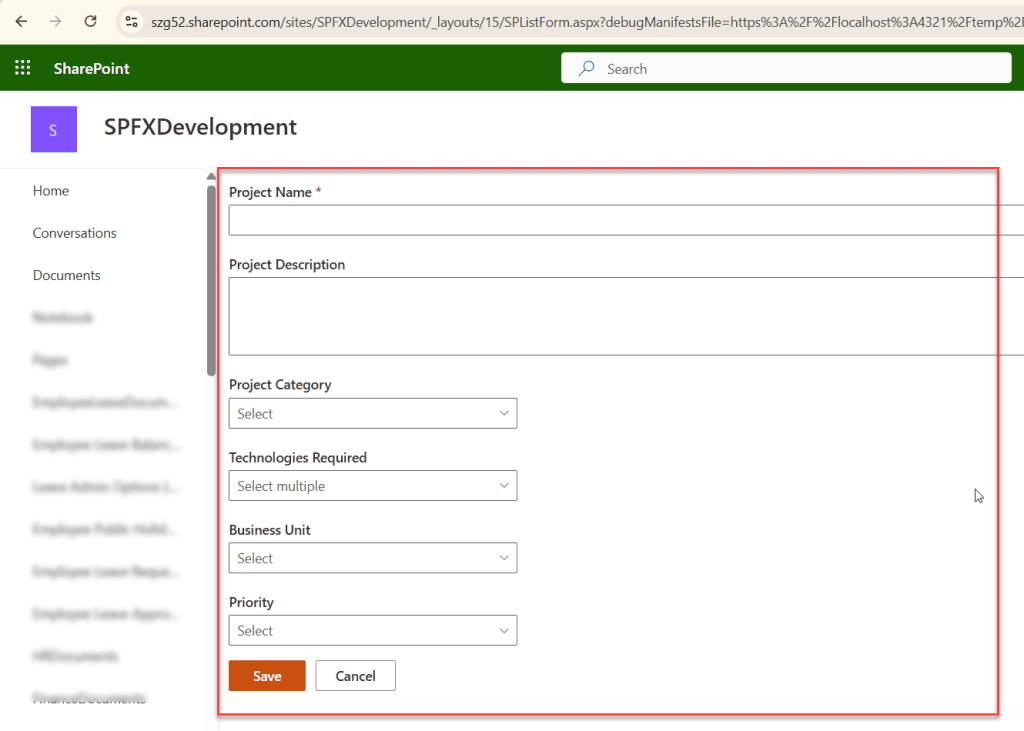
This way, you can fix this error in the SPFx form customizer extension.
I hope you now have an idea of how to solve the error: Sorry, something went wrong Error in SPFx Form Customizer. In this tutorial, I have shown why this error occurs and how to fix it. You might face this issue while working with web parts or any other extensions. Also, if you have insufficient permissions, this error will occur. So, as a developer, be more cautious while passing URLS.
Try this approach, and if you are still facing any issues, please comment below.
You may also like:
- No gulpfile found error in SharePoint Framework (SPFx)
- Fix SPFx Error: An unexpected ‘StartObject’ node was found when reading from the JSON reader. A ‘StartArray’ node was expected.
- SPFx Error: Couldn’t add this app. Check your network connection and try again
- npm install Failed: ENOENT, EPERM rmdir, EBADF Errors While Creating SPFx Solution

Hey! I’m Bijay Kumar, founder of SPGuides.com and a Microsoft Business Applications MVP (Power Automate, Power Apps). I launched this site in 2020 because I truly enjoy working with SharePoint, Power Platform, and SharePoint Framework (SPFx), and wanted to share that passion through step-by-step tutorials, guides, and training videos. My mission is to help you learn these technologies so you can utilize SharePoint, enhance productivity, and potentially build business solutions along the way.

