
In this Power Automate tutorial, we will see how to fix the error ‘an entry without a type name was found, but no expected type was specified. to allow entries without type information, the expected type must also be specified when the model is specified.’.
Recently, while creating a SharePoint list using Rest API in Power Automate, we came across an error ‘an entry without a type name was found, but no expected type was specified’.
This error states that it expects the "__metadata" property that include information about the data type and entity type name.
Below you can refer to the error we got.

So in this Power Automate tutorial, we will solve this error ‘an entry without a type name was found, but no expected type was specified’.
Error: an entry without a type name was found, but no expected type was specified in Power Automate
Here I have created an Instant cloud flow, which will trigger Manually, and then it will do a rest API call to create a SharePoint list.
Below you can refer to my flow

While doing the rest API calls using the ‘Send an HTTP request to Sharepoint’ action, we are providing the below information
- Site address: Provide the SharePoint site address
- Method: Select the method as Post
- Uri: Provide the URI as ‘_api/web/Lists/’
- Headers: provide the header as below
{
  "content-type": "application/json;odata=verbose",
  "accept": "application/json;odata=verbose"
}- Body: provide the body as
{'parameters':
{
"__metadata":{"type":"SP.List"},
"BaseTemplate": 100,
"Title": "Flow Employees",
"Description": "Employees Details List"
}
}
Now if I run the flow, I get an error ‘an entry without a type name was found, but no expected type was specified’
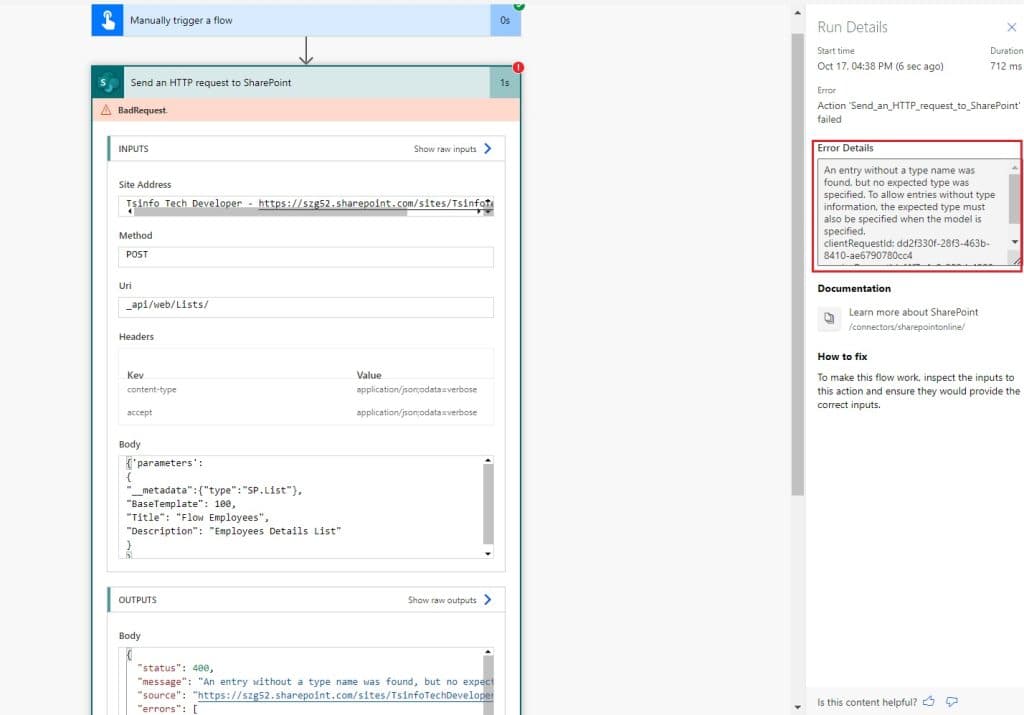
In the next section, we will see how we can fix the error ‘ an entry without a type name was found, but no expected type was specified in Power Automate.
Solution: an entry without a type name was found, but no expected type was specified in Power Automate
Here first let’s understand the error ‘an entry without a type name was found, but no expected type was specified’ in Power Automate.
If you look closely at the body of the Send an HTTP request to SharePoint action, we specified the body as follows:
{'parameters':
{
"__metadata":{"type":"SP.List"},
"BaseTemplate": 100,
"Title": "Flow Employees",
"Description": "Employees Details List"
}
}
Here the parameter properties we have provided are not required to create a Sharepoint list. To resolve this error, we need to provide the body as below:
{
    "__metadata": { "type": "SP.List" },
    "BaseTemplate": 100,
    "Title": "Flow Employees",
    "Description": "Employees Details List"
}

Now if you run the flow, it will run successfully and create a SharePoint list using Power Automate.
Conclusion
In this Power Automate tutorial, we saw how to fix the error “an entry without a type name was found, but no expected type was specified. to allow entries without type information, the expected type must also be specified when the model is specified.” in Power Automate.
You may also like:
- Microsoft Flow: The execution of template action ‘Switch’ failed: The result of the evaluation of ‘scope’ action expression ‘@triggerBody()?[‘ApprovalStatus’] is not valid.
- The ETag of this item does not match the one used for setting content approval status error in Power Automate
- How to split a string into an array in Power Automate?

Hey! I’m Bijay Kumar, founder of SPGuides.com and a Microsoft Business Applications MVP (Power Automate, Power Apps). I launched this site in 2020 because I truly enjoy working with SharePoint, Power Platform, and SharePoint Framework (SPFx), and wanted to share that passion through step-by-step tutorials, guides, and training videos. My mission is to help you learn these technologies so you can utilize SharePoint, enhance productivity, and potentially build business solutions along the way.


No, this did not work for me