
Do you want to format a number in Power Automate? Here, I will explain how to use formatnumber() function in Power Automate to format a number. Then, I will show you how to use the format number Power Automate flow action.
Power Automate provides two ways to format a number inside a flow
- formatNumber() function
- Format Number action
Let us check with examples.
formatNumber() in Power Automate
In Power Automate formatNumber() function accepts a number and converts it into the required format; it can be a currency, percentage float, etc.
Here is the formatNumber() expression syntax.
formatNumber(Number, 'format', 'locale')- Number: This is the number you want to format
- ‘format’: Then the number will get formatted.
- Locale: Provide the locale, while formatting the number as currency[optional]
For example, we need to format the decimal number into percentages; for this, we can use the expression below
- formatNumber(0.6, 0.00%), it returns 60.00%.
- formatNumber(0.6, 0%), it returns 60%.
Now, let’s see how to use the formateNumber function in a flow in Power Automate.
1. Open Power Automate, click on + Create, and then select “Instant cloud flow“

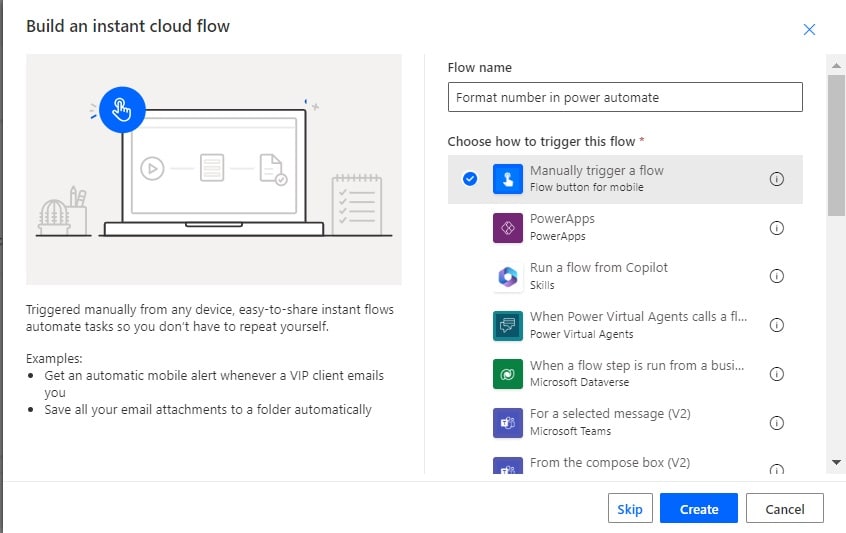
2. Then provide the flow name and select the “Manually trigger a flow” action. Then click on Create.

3. Then click on the +Add an input, then select the Number option, and the Number field is added to the action.

4. Now, we will convert the given decimal number to a percentage. For this, click on Add an action and select Compose action. Then provide the below information:
- Inputs: Provide the below expression:
formatNumber(triggerBody()['number'],'0.00%')
5. Now save the flow and run the flow manually, then provide any decimal number. You can see the number is formatted to percentage.

To convert the decimal number 0.6 to percentage 60%, use the below expression in the compose action input field.
formatNumber(0.6, 0%), it returns 60%.
Now, if you run the flow manually and provide the input number as 0.6, you can see the output as 60%.

This is how to use the formatNumber() function in Power Automate.
Format Number action in Power Automate
Here, we will see how to use the Format Number flow action in Power Automate.
The format number action also works in the same way as the formatNumber() function works. The format action also takes the same input i.e. Number, format, and Locale.
Here is an example.
1. Open Power Automate Cloud flow, then select the instant cloud flow.

2. Then, provide the flow name and select the “Manually trigger a flow” action. Then click on Create.
3. Now, we will convert the given decimal number to a percentage. For this, click