How to Apply Filter Between Dates in Power Automate?

Apply Filter Between Dates in Power Automate

Doesn’t know how to apply filter between dates in Power Automate? Then this Power Automate tutorial will help you to apply filters between dates using flow with different examples. Moreover, we will also cover below points: In this tutorial, we will use the Products Orders SharePoint List consisting of Product ID, Product Name, Product Color, … read more…

How to Hide Top Navigation Bar in Power Apps?

How to Hide Top Navigation Bar in Power Apps

Do you know the trick of How to Hide Top Navigation Bar in Power Apps? No problem! This Power Apps tutorial will explain to you what are the simple ways to hide the top navigation bar in Power Apps Canvas app. Also, we will see how to hide the Power Apps Navigation Bar Permanently. Check … read more…

How to Launch Email in Power Apps

Power Apps Launch Email

Are you aware of what Power Apps Launch Email is and how it works? Well, in this Power Apps tutorial, I will show you How to Launch Email in Power Apps in detail. Also, we will see how to Launch Email Power Apps from a Button control with various examples. Check out: Power Apps Modern … read more…

How to Create an HTML Table in Power Automate?

create html table in power automate

In this Power Automate tutorial, we will learn how to create an HTML table in Power Automate. We will also cover the below topic with different examples. Recently, I got a requirement to send SharePoint list items in an HTML table format in an email using Flow. So, for that, I have used the below … read more…

How to Add Rows to Excel in Power Automate?

Add Rows to Excel in Power Automate

As a Power Automate developer, sometimes, you might need to add rows to Excel in Power Automate. In this tutorial, I will explain how to add rows to Excel in Power Automate. We will also discuss the following points: Let’s start with our first topic ‘Power automate add a row to Excel’ to understand what … read more…

How to Add Gallery Data to a Collection in Power Apps

How to Add Gallery Data to a Collection in Power Apps

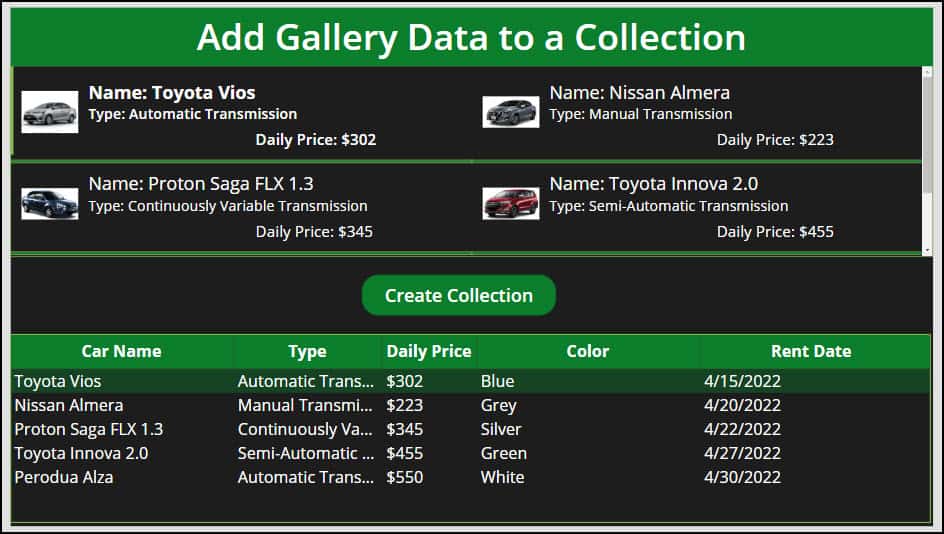
Do you know how to add gallery data to a collection in Power Apps? Well, in this Power Apps tutorial, we will discuss how we can add gallery items to a collection in Power Apps. Also, we will see how to add some specific columns from the gallery control to the Power Apps collection. Moreover, … read more…

Power Apps functions free pdf

30 Power Apps Functions

This free guide walks you through the 30 most-used Power Apps functions with real business examples, exact syntax, and results you can see.

Live Webinar

Create a SharePoint List & Columns from Excel Using Power Automate

Learn how to automatically create a SharePoint Online list and all its columns from an Excel file using Power Automate—without using any Premium connectors..

📅 4th Aug 2026 – 10:00 AM EST | 7:30 PM IST

Download User registration canvas app

DOWNLOAD USER REGISTRATION POWER APPS CANVAS APP

Download a fully functional Power Apps Canvas App (with Power Automate): User Registration App